Hands-Free Business Intelligence Setup Guide 2026
Hands-free business intelligence (BI) is the practice of automating data querying, integration, and reporting so teams get answers without writing SQL or building dashboards manually. This hands-free business intelligence setup guide covers every phase of that process, from prerequisites and security configuration to deployment and ongoing maintenance. The core insight is simple: automation without governance fails. Every successful hands-free BI system combines AI-driven query handling with enforced access controls, dataset indexing, and a phased rollout strategy. Skopx connects with nearly 1,000 integrations to make this possible from a single interface.
What does a hands-free business intelligence setup require?
A hands-free BI setup requires four components working together: a connected data source, an AI query layer, a governed permission model, and a rollout mechanism. Miss any one of these and the system either breaks or leaks data. Teams that skip the permission layer in particular create serious compliance exposure.
The industry term for this architecture is agentic analytics, where AI agents query data on behalf of users using the same access rules that govern human analysts. The "hands-free" framing describes the user experience. The underlying standard is governed agentic access, which enforces row-level and column-level permissions consistently across both human and AI queries. That consistency is what prevents data leakage when agents run at scale.

Dataset indexing is equally non-negotiable. Enabling indexing on datasets maps natural language questions to the correct data models, which is how AI assistants translate "show me Q3 revenue by region" into an accurate query. Without indexing, the AI guesses at table relationships and produces unreliable answers.
Tools and prerequisites for automated business intelligence setup
Before you deploy anything, confirm you have these components in place.
Core requirements by category
| Category | Requirement | Why it matters |
|---|---|---|
| Data source | Read-only dedicated database account | Limits blast radius if credentials are compromised |
| AI integration | API key for an LLM provider (e.g., Anthropic) | Powers natural language query translation |
| Dataset indexing | Index enabled on all target datasets | Maps user questions to correct data models |
| Permission model | Role-based access with least privilege | Prevents unauthorized data exposure |
| Deployment control | Server-side feature flags | Enables gradual, controlled rollout |
What "least privilege" means in practice
Least privilege in BI security means every database account, every role, and every AI agent gets only the permissions it needs to complete its specific task. Nothing more. Granular permission sets define what actions each role can perform, down to whether a role can add, delete, or view specific records. This is not optional hardening. It is the baseline for any production BI system that handles real business data.
Pro Tip: Create a dedicated read-only database user for your BI platform before connecting any data source. Never use an admin account for BI queries, even during testing.
A practical example of rapid setup comes from AI assistant configurations that require an LLM API key, a connected database, and strategic table documentation. Setup can take under 30 minutes when prerequisites are in place. That speed is only achievable because the hard work happens before you touch the AI layer: clean permissions, indexed datasets, and documented tables.
How do you deploy a hands-free BI system step by step?
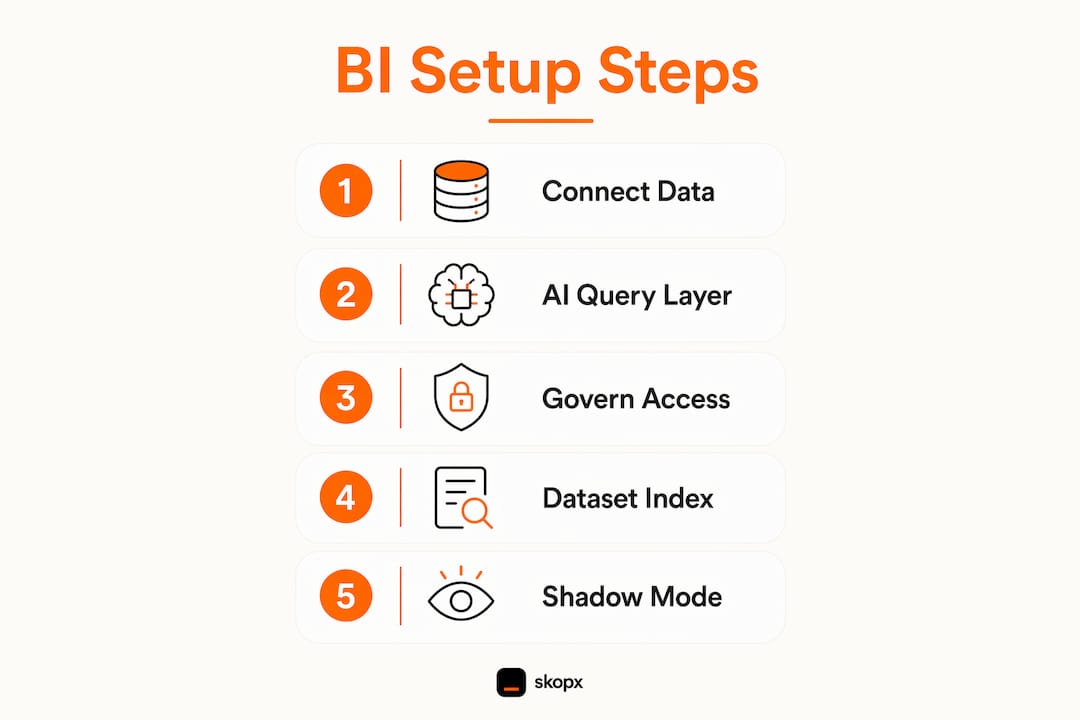
Deployment has three phases: integration, configuration, and rollout. Skipping phase two (configuration) is the most common reason teams end up with a system that answers questions incorrectly or exposes data it should not.
Phase 1: Integration
- Create a dedicated read-only database user with minimum required permissions.
- Connect your data warehouse or database to your BI platform using that account.
- Add your LLM API key (for example, an Anthropic API key) to the AI assistant configuration.
- Enable dataset indexing on all tables the AI assistant will query.
- Add table and column descriptions to every dataset the AI will access.
Phase 2: Configuration
- Define role-based access groups that mirror your organization's data access policy.
- Apply row-level security rules so each user role sees only its permitted data.
- Apply column-level masking to sensitive fields such as salary, PII, or financial identifiers.
- Test each role by logging in as a representative user and running sample queries.
Phase 3: Rollout
- Enable shadow mode before going live with any AI agent.
- Monitor shadow mode logs for accuracy and permission compliance.
- Promote to production only after shadow mode match rates meet your accuracy threshold.
Rollout approach comparison
| Approach | Risk level | Best for |
|---|---|---|
| Full production launch | High | Small, low-stakes datasets only |
| Shadow mode first | Low | Any production environment |
| Phased flag-based rollout | Low to medium | Large teams with varied data access |
Shadow mode is the safest rollout mechanism available. Shadow mode runs fire-and-forget alongside your existing systems, logging what the AI agent would have done without affecting real users or adding latency. Think of it as a parallel execution layer that measures accuracy in a live environment before you commit to it.
Governed agentic access is the third critical pillar of trustworthy agentic analytics, alongside speed and accuracy. AI agents must inherit the same data permissions as human analysts. Any deviation creates a policy violation risk that standard BI audits will catch.
Pro Tip: Use server-side flags like shadow_enabled and shadow_sample_rate to control rollout volume. Start at 10% of traffic, review logs, then scale up. This keeps costs predictable and risk contained.
How do you maintain and troubleshoot a hands-free BI system?
A deployed system needs active monitoring. The three metrics that matter most are shadow mode match rate, query latency, and permission error frequency. Each one tells you something different about system health.
Key metrics to track
- Shadow mode match rate: The percentage of AI-generated answers that match expected outputs. A rate below your defined threshold signals a data documentation or indexing problem.
- Query latency: Shadow mode should never increase production latency. If latency rises after enabling AI queries, check whether shadow calls are blocking rather than running asynchronously.
- Permission error rate: Frequent access errors indicate that role definitions are too narrow or that dataset permissions were not applied consistently across all layers.
Common issues and fixes
- AI returns wrong data: The most common cause is missing or vague table descriptions. Add plain-English descriptions to every column the AI queries. AI assistants perform best when properly mapped to data models through indexing and documentation.
- Users see data they should not: This is a row-level security misconfiguration. Audit each role's filter rules and retest with a non-admin account.
- Agents bypass governed models: Agentic BI failures commonly stem from granting raw table access instead of routing queries through governed semantic models. Route all agent queries through your semantic layer, not directly to raw tables.
- Slow query responses: Check whether the AI is generating overly broad SQL. Add query scope limits in your dataset configuration to prevent full-table scans.
Pro Tip: Schedule a monthly permission audit. Role definitions drift over time as teams change. A quarterly review is not frequent enough for fast-moving organizations.
For business intelligence for remote teams, the maintenance burden is higher because data access patterns vary across time zones and departments. Build your monitoring dashboards to segment permission errors by team and region. That segmentation makes root cause analysis faster.
What are the best practices and future trends in hands-free BI?
The most important practice is enforcing least privilege at every layer: the database, the data warehouse, and the semantic model. Consistent enforcement across all three layers is non-negotiable for secure hands-free BI. Teams that enforce it at the database level but ignore it at the semantic layer still have a vulnerability.
Emerging techniques are pushing the boundary of what automated BI can do. Autonomous reflections allow AI agents to evaluate their own query outputs and flag low-confidence answers for human review. AI-native SQL functions are beginning to appear in enterprise data platforms, letting analysts call AI capabilities directly inside SQL queries. Both techniques require the same governed access foundation described throughout this guide.
Continual auditing is the practice that separates mature BI deployments from fragile ones. Policy reassessment should happen on a fixed schedule, not only after an incident. As your data catalog grows, new tables and columns need documentation and permission rules before the AI assistant can use them reliably.
"Governed agentic access is not a feature you add later. It is the foundation you build on from day one. Every shortcut taken during setup becomes a compliance problem at scale."
For teams working with AI agents for enterprise deployments, the governance framework described here applies directly. The same row-level and column-level controls that protect human analysts protect AI agents. The architecture does not change. The enforcement must be consistent.
Key Takeaways
A hands-free BI system succeeds only when governed access, dataset indexing, and shadow mode rollout are in place before AI agents touch production data.
| Point | Details |
|---|---|
| Governed access is foundational | AI agents must inherit the same row-level and column-level permissions as human analysts. |
| Dataset indexing drives accuracy | Indexing maps natural language questions to the correct data models for reliable answers. |
| Shadow mode reduces rollout risk | Run AI agents in shadow mode first to measure accuracy without affecting live users. |
| Least privilege applies everywhere | Enforce minimum permissions at the database, warehouse, and semantic layers simultaneously. |
| Documentation improves AI quality | Adding table and column descriptions directly improves the accuracy of AI-generated queries. |
What I have learned from watching hands-free BI deployments succeed and fail
The teams that struggle most with automated BI setup are not the ones with the most complex data. They are the ones that treat governance as a final step rather than a starting point. I have seen organizations spend weeks configuring AI query layers only to discover their permission model was built for human analysts and never extended to cover agent-generated queries. The result is a system that works in demos and fails in production.
The phased rollout using shadow mode is not just a safety mechanism. It is the fastest way to build organizational trust in an AI-driven system. When stakeholders can see logged evidence that the AI would have answered correctly before it goes live, adoption accelerates. That evidence is more persuasive than any benchmark.
The other pattern worth noting: data documentation is consistently underestimated. Teams invest heavily in API connections and permission rules, then ship a system where the AI cannot reliably distinguish between a "revenue" column that means gross revenue and one that means net revenue. Plain-English column descriptions cost almost nothing to write. They have an outsized impact on answer quality.
My honest recommendation is to treat your first hands-free BI deployment as a learning environment, not a production commitment. Use shadow mode, measure match rates, fix documentation gaps, and only then promote to live. The automated data analysis platform approach works best when you give it a clean, well-documented data foundation to work from.
Skopx
Skopx for hands-free BI: from setup to production
Skopx connects nearly 1,000 data integrations into a single AI-driven interface, letting your team query data and trigger actions in real time without writing SQL or managing separate dashboards.
The Skopx AI consulting team works with business professionals to design governed agentic analytics architectures from the ground up, covering permission modeling, dataset indexing, and phased rollout planning. For teams that want to move faster, the Skopx AI agent platform provides pre-built agent workflows that enforce least privilege and row-level security out of the box. Contact Skopx to discuss a hands-free BI implementation built for your data environment and compliance requirements.
FAQ
What is hands-free business intelligence?
Hands-free business intelligence is the practice of automating data querying, reporting, and integration so teams get answers without manual SQL or dashboard work. It relies on AI agents, governed access controls, and dataset indexing working together.
How long does a hands-free BI setup take?
A basic AI assistant setup with a connected database, API key, and dataset documentation can be completed in under 30 minutes. A full production deployment with governed permissions and shadow mode testing typically takes several days to weeks depending on data complexity.
What is shadow mode in BI deployment?
Shadow mode runs an AI agent alongside your existing system, logging what it would have done without affecting real users or adding latency. It is the safest way to measure AI accuracy before promoting to production.
Why do AI agents need governed semantic models?
Granting AI agents raw table access instead of governed semantic models is the leading cause of agentic BI failures. Governed models enforce row-level and column-level permissions consistently, preventing policy violations by AI-generated queries.
What permissions does a BI database account need?
A BI database account should be read-only and scoped to only the tables the AI assistant needs to query. Least privilege principles require that no account, human or AI, holds more access than its specific task requires.
Recommended
Skopx Team
The Skopx engineering and product team