How to Set Up AI-Driven Business Automation
AI-driven business automation is the practice of using artificial intelligence to execute recurring business tasks without manual intervention, replacing human effort on predictable, rule-based work. Project managers and team leaders who set up AI-driven business automation correctly can recover 14 hours of operational capacity per week for a 10-person team without hiring new technical staff. The industry term for this discipline is intelligent process automation, and it sits above traditional rule-based automation by handling judgment calls, not just if/then logic. This guide walks you through task selection, system design, deployment, and iteration so you can build automation that actually reaches production.
Which business tasks are best suited for AI-driven automation?
The best candidates for automation share three traits: they repeat frequently, they consume significant time, and they follow a consistent pattern. Data entry, inbox triage, customer support routing, inventory status updates, and weekly reporting all meet this standard. Tasks that require creative judgment or relationship nuance, such as contract negotiation or client strategy calls, do not.
Prioritize by impact, not by ease. A task that takes 45 minutes and happens four times a week is worth far more attention than a task that takes five minutes once a month. The goal is to free up blocks of time that your team can redirect toward revenue-generating work.
Start with one task only. Adding one automated task every two weeks produces a 15%–25% increase in automation coverage within three months. That cadence gives your team time to validate each workflow before layering on the next one.
- Repetition: The task happens at least three times per week.
- Time cost: Each instance takes more than 15 minutes to complete manually.
- Consistency: The steps follow the same sequence every time with minimal exceptions.
- Data availability: The inputs already exist in a digital format your tools can read.
Pro Tip: Map your team's weekly tasks in a shared spreadsheet and flag anything consuming over 15 minutes that repeats more than twice weekly. That list is your automation backlog.
What tools and foundational elements do you need?
The foundation of any reliable AI automation system is not the AI model itself. 80% of the effort goes into scoping the correct process and designing human-review loops. The technology accounts for only 20%. Teams that skip this phase often spend six months building demos that never reach production.

Building context files
Context files with structured business information are what separate functional automation from generic chatbot behavior. These are small, structured documents containing your business strategy, team roles, client history, and standard operating procedures. The AI reads them before every task. Without them, the model operates on assumptions rather than your actual business rules.
Centralizing your data
You do not need to migrate everything to a new platform. Connect your existing tools through a unified interface that lets the AI read and write data across systems. Skopx connects with nearly 1,000 integrations, which means your CRM, finance tools, and communication platforms can feed a single AI layer without a full migration project.
Choosing the right automation platform
| Platform type | Best for | Key limitation |
|---|---|---|
| Low-code/no-code workflow tools | Teams without developer resources | Limited handling of complex logic |
| AI orchestration platforms | Multi-step, judgment-based workflows | Requires proper context file setup |
| Enterprise AI suites | Large-scale, cross-department automation | Higher cost and longer setup time |
Human-in-the-loop checkpoints
Human-in-the-loop validation is mandatory for any action that touches external communication or modifies a database record. Treat AI agents as supervised staff, not autonomous systems. Build approval steps into every workflow that carries meaningful risk. This is not a limitation. It is the design principle that keeps automation trustworthy.
For teams exploring how AI-driven automation applies to content and publishing workflows, the same human checkpoint principle applies across industries.
How do you implement and deploy an AI automation project?
A focused first automation project takes 6–10 weeks from scoping to deployment. That timeline is not a rough estimate. It reflects the actual phases required to build something production-ready.
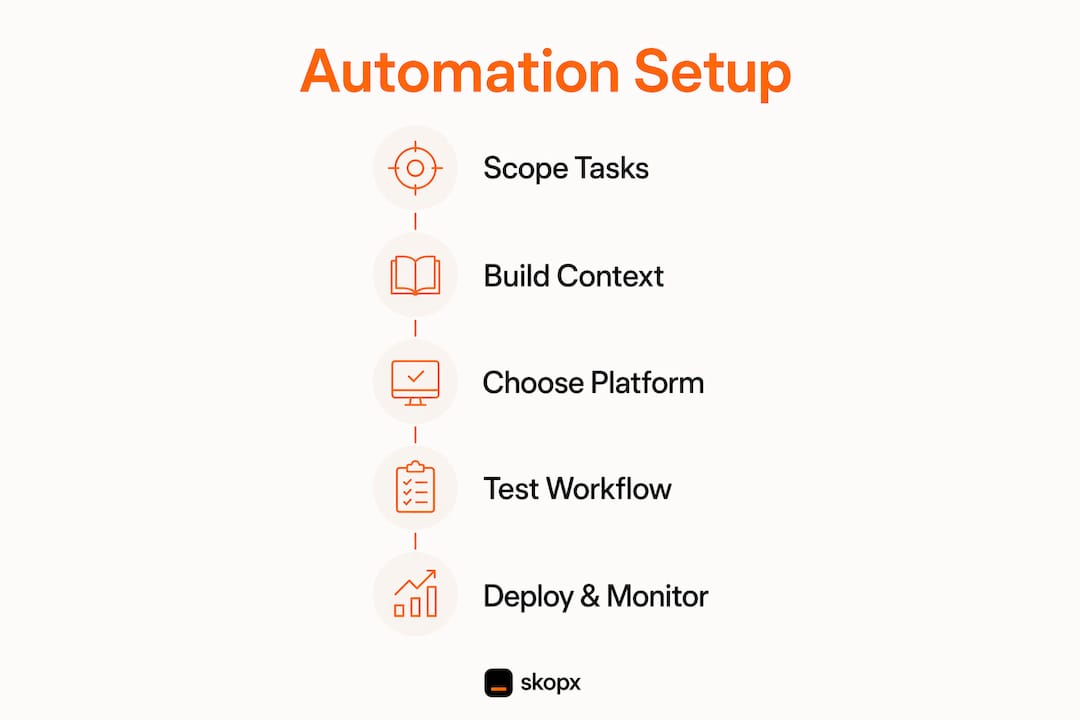
The five phases of implementation
- Scoping (2 weeks): Document the current process in detail. Map every input, decision point, and output. Identify edge cases. Define what "correct" looks like so you can measure it later.
- Design (1–2 weeks): Build the workflow logic and design the human-review checkpoints. Decide which actions require approval and which can run autonomously.
- Build (2–3 weeks): Develop the automation using your chosen platform. Connect data sources, configure the AI model with your context files, and set up the monitoring dashboard.
- Testing (1–2 weeks): Run a parallel period where the AI processes real tasks but does not write to any records. Compare AI outputs to human outputs side by side.
- Deployment (1 week): Move the automation into production with monitoring active and a kill switch in place.
The testing phase deserves special attention. A parallel-run period of 2–4 weeks lets you validate accuracy, surface edge cases, and build team trust before the AI touches live data. Skipping this step is the single most common reason automation projects fail after launch.
Pro Tip: During parallel testing, track every case where the AI output differs from the human output. Those discrepancies become your edge case library and directly improve the next version of the workflow.
Monitoring and safety controls
Implementing a kill switch and an API token budget is not optional. A runaway AI agent can consume significant API costs within minutes if no cap exists. Set a maximum action budget per run. Build a dashboard that shows task volume, error rate, and cost per workflow. Review it weekly during the first month of deployment.
| Safety control | Purpose | When to trigger |
|---|---|---|
| Kill switch | Stops all agent activity immediately | Unexpected behavior or cost spike |
| Action budget | Caps API calls per session | Set at deployment, reviewed monthly |
| Human review loop | Approves high-risk outputs | Before any external send or record write |
| Monitoring dashboard | Tracks accuracy and cost in real time | Reviewed weekly for first 30 days |
How do you measure success and keep improving?
The right metrics tell you whether your automation is working or just running. Track three numbers from day one: time saved per week, accuracy rate compared to manual work, and team adoption rate. If adoption is low, the workflow has a usability problem, not a technology problem.
A one-person AI back office can turn hours of administrative work into minutes of review using a single model, a central database, and scheduled routines. That is the target state: management by exception, where your team reviews flagged items rather than processing every transaction manually.
Reinvest reclaimed time deliberately. If automation frees up eight hours a week across your team, assign those hours to a specific activity, such as client outreach, product development, or process documentation. Unassigned time disappears into low-value tasks within weeks.
- Time saved: Measure weekly hours recovered per team member before and after deployment.
- Accuracy rate: Compare AI output error rate to your pre-automation baseline.
- Adoption rate: Track what percentage of eligible tasks actually run through the automated workflow.
- Cost per task: Calculate AI processing cost versus previous labor cost for the same task.
Pro Tip: Schedule a 30-minute automation review every two weeks. Use it to decide which task to automate next and to check whether existing workflows need adjustment. Consistency here compounds fast.
Avoid two common mistakes. The first is skipping proper scoping because the task "seems simple." Simple tasks often have more edge cases than complex ones. The second is ignoring user feedback from the team members who interact with the automated workflow daily. Their friction points are your improvement roadmap.
For small business teams looking at AI-driven efficiency gains in customer-facing operations, the same measurement framework applies: track time, accuracy, and adoption before drawing conclusions about ROI.
Key Takeaways
Successful AI automation requires structured scoping, human-in-the-loop design, and a fortnightly scaling cadence to build reliable, production-ready workflows that deliver measurable time savings.
| Point | Details |
|---|---|
| Start with one high-impact task | Choose tasks that repeat three or more times weekly and take over 15 minutes each. |
| Build context files first | Structured business information files are what make AI outputs accurate and consistent. |
| Run parallel testing for 2–4 weeks | Compare AI outputs to human outputs before writing to any live records. |
| Install a kill switch at deployment | Cap API budgets and monitor dashboards weekly to prevent runaway costs. |
| Scale at one task per fortnight | This cadence produces 15%–25% automation growth within three months without overwhelming teams. |
What we've learned from watching teams automate too fast
The teams that get the most from AI automation are almost never the ones who move fastest. They are the ones who spend the most time on scoping. Every project I have seen stall in production had the same root cause: the team defined the task at a surface level and discovered the real complexity only after deployment.
The human-in-the-loop principle is not a temporary workaround until AI gets smarter. It is a permanent design choice that reflects how accountability works in a business. When an AI agent sends an email to a client or updates a financial record, someone on your team is still responsible for that action. Build the workflow to reflect that reality.
Starting small also builds something that speed cannot: team trust. When colleagues see one automated workflow run accurately for four weeks, they become advocates for the next one. When they see a rushed deployment produce errors, they become blockers. The fortnightly cadence is as much a change management strategy as it is a technical one.
AI automation's long-term role in business is management by exception. Your team stops processing transactions and starts reviewing flagged anomalies. That shift requires well-designed systems, not just fast ones. The teams building that future right now are the ones taking the time to do it properly.
Skopx Team
How Skopx supports your automation build
Skopx gives project managers and team leaders a unified AI interface that connects nearly 1,000 business tools, so you can query data and trigger automated actions without switching between platforms.
The Skopx AI QA Agent generates test cases, test plans, and bug reports from screenshots and requirements, so your reviewers spend their time on exceptions instead of writing QA artifacts by hand. Skopx's cross-tool AI chat pulls and analyzes data across your connected tools in real time, replacing hours of manual reporting, and answers natural-language questions against SQL and MongoDB databases directly. These tools are designed to plug into existing workflows, not replace your current stack. If you are ready to move from planning to implementation, Skopx already draws the line this guide recommends: monitoring, anomaly alerts, morning briefings, and scheduled social publishing run autonomously, while any action that touches your systems runs on your instruction.
FAQ
How long does a first AI automation project take?
A focused first project takes 6–10 weeks, covering scoping, design, build, testing, and deployment. Rushing any phase increases the risk of a workflow that fails in production.
What tasks should I automate first?
Start with tasks that repeat at least three times per week and take more than 15 minutes each. Data entry, inbox triage, and status reporting are the most common high-value starting points.
Do I need a developer to implement AI business automation?
Not always. Low-code and no-code AI orchestration platforms let non-technical teams build and deploy workflows. Complex, multi-step automations with custom logic typically benefit from developer involvement during the build phase.
What is a human-in-the-loop checkpoint?
A human-in-the-loop checkpoint is a mandatory approval step built into an automated workflow. Industry practice requires these checkpoints for any action that sends external communications or modifies database records.
How do I prevent an AI agent from running out of control?
Set an explicit action budget that caps the number of API calls per session, and build a kill switch that stops all agent activity immediately. Runaway agents without these controls can generate significant unexpected costs within minutes.
Share this article
Skopx Team
The Skopx engineering and product team